


Table of Contents
Looking for the best WooCommerce product search plugin for your store?
Product search is one of the most important parts of the online shopping experience. Customers rarely want to work their way down through categories and subcategories. They go straight to the search bar and expect fast, accurate results.
When search fails, visitors leave – and those lost sessions turn into lost sales. That makes WooCommerce search a conversion feature, not a cosmetic one.
The problem is that WooCommerce’s default search is limited. It looks at a handful of basic fields, has no live suggestions, and offers nothing in the way of typo handling, synonyms, or filtering. On a catalog of twenty products that’s survivable. On a catalog of two thousand, it’s a leak in your funnel.
The good news: this is a solved problem. A dedicated WooCommerce product search plugin adds the speed, accuracy, and modern behavior shoppers already expect from every other store they visit.
Below are seven of the strongest options on the market, with features, trade-offs, and pricing for each – plus a framework for deciding which one actually fits your store.
Why Product Search Matters In WooCommerce
Shoppers who use the search bar convert at a noticeably higher rate than shoppers who only browse. The reason is simple: searchers arrive with intent. They already know what they want and are just trying to reach it in as few steps as possible.
That gap widens as your catalog grows. A shop with a dozen products doesn’t need much. Once you’re past a few hundred SKUs, browsing stops scaling. If someone searches for “red running shoes” and your store returns nothing useful, there’s a good chance the next thing they search is a competitor’s name.
Good product search closes that gap. It shortens the path from query to checkout and makes the whole experience feel less like work. Modern plugins go well past keyword matching – they handle typos, recognize synonyms, and surface related products the shopper hadn’t thought to look for.
At a minimum, today’s shoppers expect:
– Live autocomplete suggestions as they type
– Results filtered by category, price, or attribute
– Fast, relevant matches that behave the same on desktop and mobile
– Product images, prices, and stock status visible directly in the dropdown
Meet those expectations and more carts get completed. Miss them and friction quietly compounds into abandoned sessions.
Limitations Of The Default WooCommerce Search
WooCommerce ships with a search function, but its ceiling is low.
By default, it only scans product titles, content, and excerpts. SKUs, attributes, categories, and custom fields are ignored entirely – which is a problem, because those are exactly the fields customers search by in technical, industrial, and fashion catalogs.
There’s also no relevance ranking. Results come back in reverse chronological order rather than by how well they match, so a marginally related item can outrank the product the customer actually wants.
Performance degrades with catalog size. The default search hits the database directly with no index and no optimization, so response times climb and server load rises as you add products.
Modern behavior is simply absent. There’s no live search or autocomplete – the shopper types, submits, and waits for a full page reload. Filtering by size, color, price, or stock status requires custom development.
Finally, there’s no analytics. Without data on what people search for and which queries return nothing, you have no way to improve your results or spot gaps in your catalog. Multilingual stores hit further trouble, with results leaking across languages.
None of this is a knock on WooCommerce – search just isn’t what the core plugin is built to solve. That’s what the tools below are for.
The 7 Best WooCommerce Product Search Plugins
Here’s how the seven compare at a glance:
| Plugin | Free version | Best known for | Pricing |
| Advanced Woo Search | Yes – core search across titles, content, SKUs, categories, tags | Deep WooCommerce field coverage and variation search | From $79/year; lifetime from $249 |
| FiboSearch | Yes – basic search and autocomplete | Raw autocomplete speed on large catalogs | From $59/first year (renewals 15% off) |
| SearchWP | No core free version (free Live Ajax Search companion) | Custom search algorithms and weighting | From $99/year (intro), normally $199 |
| Relevanssi | Yes – relevance-based search engine | Site-wide relevance and granular developer control | €120/year or €402 lifetime, unlimited sites |
| Ajax Search Pro | Yes – Ajax Search Lite | Faceted filters and deep visual customization | From €39/year; lifetime from €99 |
| YITH WooCommerce Ajax Search | Yes – essential AJAX search | Boost rules, trending searches, YITH ecosystem fit | €89.99/year |
| Ivory Search | Yes – unlimited custom search forms | Multiple targeted search forms across a site | Pro $19.99/year; Pro Plus $49.99/year |
1. Advanced Woo Search
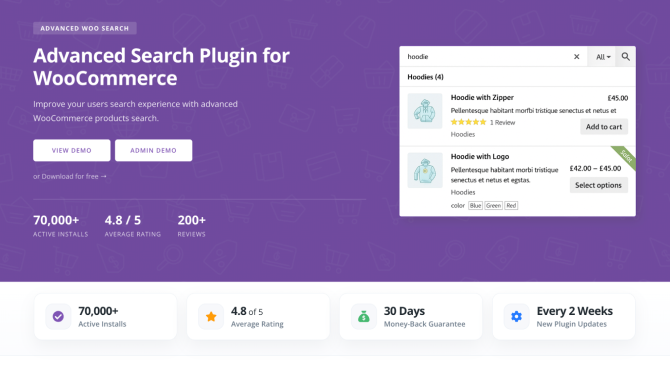
Advanced Woo Search is one of the most widely used WooCommerce search plugins, running on more than 70,000 active installs with a 4.8 average rating.
It was built specifically for WooCommerce, and that focus shows in how much of the product record it can actually reach. Instead of stopping at titles and descriptions, it searches categories, tags, SKUs, attributes, IDs, custom fields, brands, GTIN/UPC/EAN/ISBN codes, and individual product variations – so a shopper who types a model number, a color, or a barcode still lands on the right item.
The search engine layers relevance ranking, synonym support, typo correction, and live suggestions on top of that. On the store owner’s side, you get customizable result layouts, search filters, multiple search form instances, an “add to cart” button in results, and multilingual support through WPML and Polylang.
Key features
- Search across titles, content, SKUs, categories, tags, IDs, attributes, taxonomies, and custom fields
- Product variations search and display, including variation SKUs
- Brand, GTIN, UPC, EAN, and ISBN search
- Relevance-based ranking with AND search logic
- Synonyms and typo/misspelling correction
- Search suggestions and term-page (category/attribute archive) results
- Multiple search form instances with filtering buttons and result filters
- Customizable search form and results layouts, plus “add to cart” in results
- Multilingual support and integrations with 30+ WordPress plugins
Pros
- Built for WooCommerce first, so product data support is unusually complete
- Free version is genuinely usable rather than a teaser
- Lifetime licensing available – no forced annual renewal
- Support comes directly from the developer
- No external service: everything runs on your own server
Cons
- Very large catalogs benefit from decent hosting, as with any self-hosted index
- The volume of settings takes a little exploring on first setup
Pricing
- Free version on WordPress.org
- Personal: $79/year or $249 lifetime – 1 site
- Freelancer: $129/year or $399 lifetime – 5 sites
- Agency: $199/year or $599 lifetime – 25 sites
- 30-day money-back guarantee
Best for: WooCommerce stores that need to search real product data – SKUs, attributes, variations, custom fields – without paying a subscription forever.
2. FiboSearch
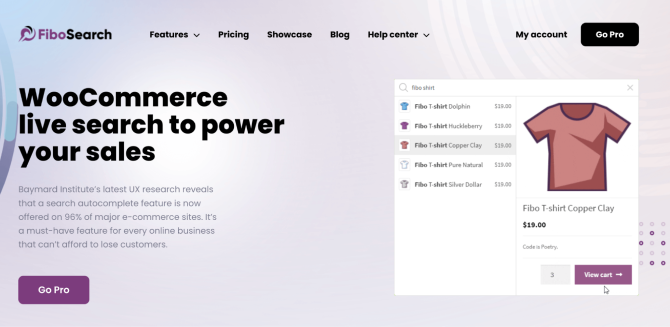
FiboSearch (formerly AJAX Search for WooCommerce) is a live search plugin built around one central promise: speed.
The Pro engine averages roughly 0.2 seconds per request, and it holds that up in stores with tens of thousands of products thanks to its own index table. Shoppers get real-time autocomplete with extended product data – images, prices, SKUs, short descriptions – and a details panel that expands on hover for a quick look without leaving the search field.
Mobile is handled well too. FiboSearch uses a Google-style full-screen overlay on small screens, which keeps the experience consistent across devices. It’s used by over 100,000 stores.
Key features
- Ultra-fast autocomplete backed by a dedicated search index
- Product image, price, SKU, and short description in results
- Categories and tags shown as suggestions
- Search by variation SKU, custom fields, and attributes
- Fuzzy search and synonym support
- Brand search, plus posts and pages in autocomplete
- Details panel on hover for quick product preview
- Mobile overlay layout and built-in search analytics
- Product exclusions and simple custom CSS
Pros
- Among the fastest autocomplete experiences available for WooCommerce
- Polished, modern UI that looks good with minimal styling work
- Strong theme compatibility and straightforward setup
- Analytics included in Pro for spotting zero-result queries
Cons
- Plans are capped by product count as well as site count, so large catalogs push you up a tier
- Subscription only – there’s no lifetime option
- Focused on the search bar itself rather than broader site-wide search
Pricing
- Free version on WordPress.org
- Personal: $59 first year – 1 site, up to 10,000 products
- Entrepreneur: $99 first year – 3 sites, up to 50,000 products per site
- Agency: $249 first year – 25 sites, up to 150,000 products per site
- Renewals discounted 15%; 30-day money-back guarantee
Best for: stores where autocomplete speed and mobile polish are the top priority, and the catalog fits comfortably inside a plan tier.
3. SearchWP

SearchWP is a premium WordPress search plugin used on more than 50,000 sites. It isn’t WooCommerce-specific, which is both its main limitation and its main strength.
Where most tools give you a fixed relevance model, SearchWP hands you the algorithm. You decide what gets indexed, assign weights to each field, and build multiple separate search engines for different parts of the site – one tuned for products, another for documentation, another for the blog. It indexes almost everything WordPress can hold, including PDFs, Office documents, media library entries, custom fields, taxonomies, and even custom database tables.
For eCommerce specifically, the Pro tier adds product data handling and integrations with WooCommerce, Easy Digital Downloads, and BigCommerce, plus metrics and visitor insights.
Key features
- Fully customizable search algorithm with per-field weighting
- Multiple independent search engines on one site
- Indexes PDFs, Office documents, media library, custom fields, and custom tables
- Keyword stemming, boolean search, and priority results
- Live Ajax search results and a modal search form
- Custom result ordering, conditional redirects, and result exclusions
- Metrics, statistics, and visitor insights (Pro)
- eCommerce product data plus WooCommerce, EDD, BigCommerce, and GiveWP integrations (Pro)
- Multisite, WPML, and Polylang support (Pro)
Pros
- The most granular relevance control of anything in this list
- Excellent when a site is more than just a shop – docs, resources, and posts all searchable
- Clean, well-designed admin interface
- Long track record and a strong support reputation
Cons
- No free core version – the free Live Ajax Search plugin is a companion, not a substitute
- WooCommerce-specific behavior sits behind the Pro tier
- Introductory pricing renews at full price, so budget for the higher number
- Front-end presentation often needs theme work to look like a modern product dropdown
Pricing
- Standard: $99/year intro (normally $199) – 1 site
- Pro: $199/year intro (normally $399) – 3 sites
- All Access Bundle (SearchWP + WPFilters): $399/year intro (normally $699) – up to 100 sites
- Free Live Ajax Search companion on WordPress.org
- 14-day money-back guarantee
Best for: content-heavy sites with a shop attached, where search needs to cover documents and posts as well as products – and where you want to tune ranking yourself.
4. Relevanssi

Relevanssi has been improving WordPress search for over a decade and sits on 100,000+ active installations with 7.7 million downloads and a 4.8 rating. It replaces the default WordPress search with a proper relevance-sorted engine.
Like SearchWP, it’s a general WordPress search plugin rather than a WooCommerce one – but it reaches WooCommerce data through custom fields, so SKUs and ACF values are searchable, and it will return category and attribute archive pages as results. Premium adds PDF indexing (handled by an external web service, which keeps it light on your server), user profile search, taxonomy term indexing, and multisite search.
Its real differentiator is control. Relevanssi exposes an unusually large set of filters and hooks, all thoroughly documented, which makes it a favorite for developers with requirements no off-the-shelf plugin covers. The plugin is now maintained by comesio solutions, with original creator Mikko Saari still leading development.
Key features
- Relevance-sorted results with configurable weighting per field
- Fuzzy matching and partial-word search
- Custom field indexing, including WooCommerce SKUs and ACF fields
- Taxonomy term and user profile results (Premium)
- PDF and attachment content indexing (Premium)
- Synonyms, stopwords, phrase matching, and keyword highlighting
- Shortcode expansion so shortcode-generated content is searchable
- Cross-subsite multisite search (Premium)
- Search logging and query analytics
- Extensive filter/hook API for custom behavior
Pros
- Unlimited sites on a single license – unusually generous
- One-off annual payment rather than an auto-renewing subscription
- Permanent license available
- Exceptional documentation and developer extensibility
- Long, stable track record with direct developer support
Cons
- Not WooCommerce-first – product-specific features need configuration or code
- No product autocomplete out of the box; you’ll want the Live Ajax Search companion for that
- Admin interface is dated and dense compared with the Woo-native options
- Advanced features assume some PHP and template knowledge
Pricing
- Free version on WordPress.org
- Annual: €120 – unlimited sites, one year of updates and support
- Permanent: €402 – unlimited sites, lifetime updates and support
- 30-day money-back guarantee
Best for: developers and agencies who want deep, hook-level control over relevance across a whole site – and don’t mind assembling the product-search UI themselves.
5. Ajax Search Pro

Ajax Search Pro from WPDreams has been in active development since 2013, with its free Lite version installed on 100,000+ sites and a 4.83 rating from over 900 reviews.
It’s the most configurable plugin here in the visual and filtering sense. Where other tools give you a search box, Ajax Search Pro gives you a search-and-filter builder: checkboxes, dropdowns, price sliders, range sliders, and date pickers can all be attached to the search form, which makes it a practical alternative to a separate product filter plugin. Four results layouts (vertical, horizontal, polaroid, isotopic), 100+ prebuilt themes, and 400+ options mean you can match almost any design without touching CSS.
On the technical side it ships with disk and database caching plus an index table for large catalogs, and it searches custom fields, ACF, taxonomies, users, and the contents of PDF, Office, and spreadsheet files. Recent versions include a built-in Search AI toolkit – a setup wizard, search quality reports, and synonym discovery – with free monthly credits and no API key required.
Key features
- Faceted search filters: categories, tags, taxonomies, price, attributes, dates
- Four results layouts and 100+ prebuilt themes
- Custom fields, ACF, taxonomies, users, and file content (PDF, Office, spreadsheets)
- Fuzzy matching, synonyms, autocomplete, and keyword highlighting
- Disk and database caching plus an index table for big catalogs
- WooCommerce and EDD integration; Elementor, Divi, Bricks, Oxygen, WPBakery, Gutenberg, GenerateBlocks
- WPML and Polylang support, plus cross-multisite search
- Built-in search statistics and Google Analytics event tracking
- Search AI: configuration wizard, quality reports, synonym discovery
- Server-side hooks, JavaScript API, REST endpoints, and template files
Pros
- Lifetime licensing still available at every tier
- No feature gating between plans – you only pay for site count
- Filters are strong enough to replace a separate product filter plugin
- Everything runs locally; no third-party search service or per-query fees
- Support handled directly by the developer
Cons
- The sheer number of options makes the first configuration slow
- General-purpose rather than WooCommerce-native, so product-specific setup takes more steps
- The admin UI feels dense next to the more streamlined Woo-only plugins
Pricing
- Free Lite version on WordPress.org
- Annual plans from €39/year
- Lifetime Single: €99 – 1 site
- Lifetime Multi: €229 – 3 sites (5- and 10-site options available)
- Lifetime Agency: €799 – 25 sites (50 and 50+ options available)
- 14-day money-back guarantee
Best for: stores that want search and faceted filtering in one plugin, complete design control, and a one-time payment.
6. YITH WooCommerce Ajax Search
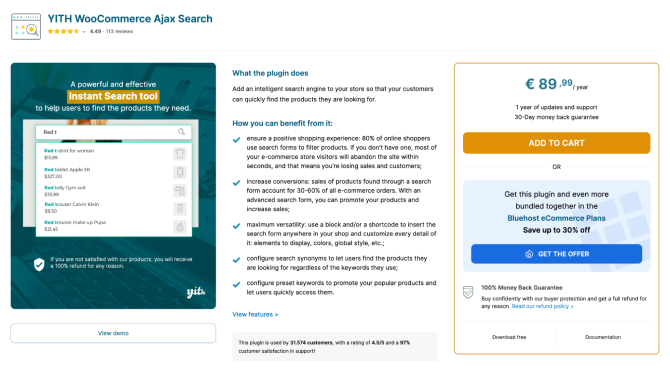
YITH WooCommerce Ajax Search is the search entry in YITH’s large WooCommerce plugin catalog, used by roughly 31,500 customers with a 4.5/5 rating.
Version 2.0 rebuilt the plugin around modern search expectations, and the current release leans hard into merchandising. Beyond the basics, you can assign a priority value to each search parameter – so exact title matches outrank description matches, which outrank attribute matches – and layer boost rules on top to push specific products, categories, or brands to the top of results. Trending and preset keywords appear when the shopper clicks into an empty search box, which turns the search bar into a promotional surface.
If your store is already built on YITH plugins, the integrations are a real advantage: Ajax Product Filter, Brands Add-On, Membership, and Multi Vendor all feed data into search results natively.
Key features
- Gutenberg block and unlimited shortcodes for placing search forms anywhere
- Per-parameter priority values (name, description, SKU, categories, tags, attributes, custom fields).
- Boost rules and boost products for merchandising control
- Synonym sets and a configurable typo tolerance threshold
- Full-screen overlay layout and a dedicated mobile layout
- List or grid results with images, price, SKU, stock, badges, and “add to cart”
- Variations shown as separate results; out-of-stock products can be hidden
- Trending/preset keyword suggestions and per-user search history
- Posts and pages included in results
- Built-in stats panel: top keywords, most-clicked products, zero-result searches
Pros
- Strong merchandising tools – boosting and trending keywords aren’t common at this price
- Native compatibility across the YITH plugin ecosystem
- Attractive, modern front end including a well-executed mobile layout
- Solid free tier for the core live search experience
Cons
- Annual subscription only; no lifetime option
- Forms are inserted via block or shortcode rather than replacing the theme’s existing search field, which can mean theme edits
- The features that matter most – extended search scope, synonyms, boosting, analytics – are all premium
- Priced per single site, so multi-site setups add up quickly
Pricing
- Free version on WordPress.org
- Premium: €89.99/year per license, including one year of updates and support
- 30-day money-back guarantee
Best for: stores already running YITH plugins, and merchants who want to actively promote products inside search results.
7. Ivory Search
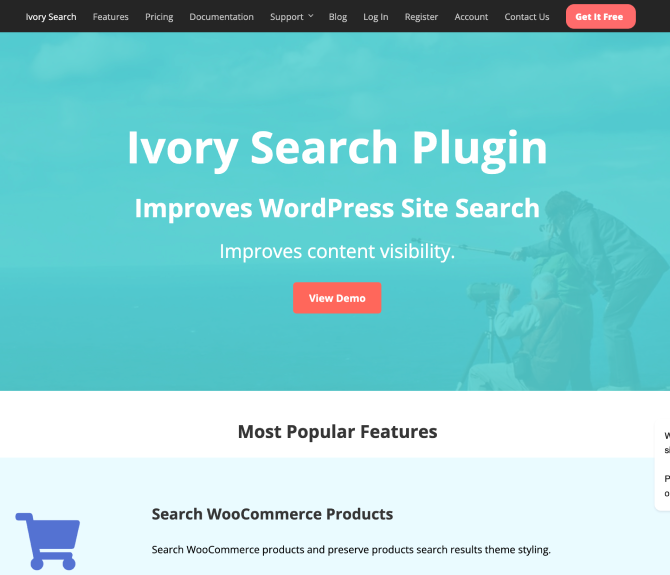
Ivory Search takes a different angle from everything else on this list. Rather than optimizing one search bar, it lets you create unlimited custom search forms, each configured independently and placed wherever you need it – header, navigation menu, sidebar, widget area, or inside content via shortcode.
That makes it useful when different parts of a site should search different things. A menu search that only returns products, a support-page search that only returns documentation, a media search that only returns downloadable files: all three can coexist with separate rules. It also indexes images, attachments, and documents by title, caption, and description, which the product-focused plugins generally skip.
For WooCommerce specifically, the Pro Plus tier adds SKU search, keyword stemming, and the ability to exclude out-of-stock products from results.
Key features
- Unlimited search forms, each configured separately
- Place forms in menus, headers, sidebars, widgets, or content via shortcode
- Include or exclude specific content types, posts, authors, or post statuses
- Search images, attachments, and media by title, caption, and description
- Taxonomy-term logic (match any or all terms) and whole/partial word matching
- WooCommerce product search, plus bbPress forum support
- Result ordering and custom-field-based exclusions (Pro)
- WooCommerce SKU search and keyword stemming (Pro Plus)
- Exclude out-of-stock products and filter by media file type (Pro Plus)
Pros
- By far the cheapest premium tier here
- Free version is unusually capable, including unlimited forms
- Excellent for adding search to a menu without theme edits
- Both annual and one-time payment options available
Cons
- Not a true product-discovery experience – no rich autocomplete with images, prices, and variations
- No synonyms, fuzzy matching, or boost rules
- SKU search requires the top Pro Plus tier
- No search analytics
Pricing
- Free version on WordPress.org
- Pro: $19.99/year – ordering, author and post-status filters, exclusions
- Pro Plus: $49.99/year – WooCommerce SKU search, keyword stemming, out-of-stock exclusion
- Available for 1, 5, or 25 sites, annually or as a one-time payment
- 30-day money-back guarantee
Best for: smaller stores and content sites that need several targeted search forms on a tight budget, rather than a full product-discovery engine.
How to Choose the Right WooCommerce Search Plugin
Seven good options is a nice problem to have, but it’s still a decision. These are the factors that actually change the answer.
Store size and catalog complexity. A shop with fifty simple products will be well served by almost anything here, including the free tiers. Once you’re into thousands of products – especially variable products with meaningful attribute data – you need indexing, variation support, and attribute search. That narrows the field to the plugins built around a dedicated index.
What your customers actually type. This is the most underrated question. If shoppers search by SKU, model number, or part code, SKU and custom field coverage is non-negotiable. If they search by descriptive language (“waterproof winter jacket”), synonyms and fuzzy matching matter more. Check your existing search logs before you decide – the answer is usually already in your data.
Scope: products only, or the whole site? If your site is a shop and nothing else, a WooCommerce-native plugin will get you there faster and with less configuration. If you also have documentation, a knowledge base, PDFs, or a substantial blog, a general-purpose engine that indexes everything is the better foundation.
Budget and licensing model. Annual subscriptions and lifetime licenses have very different five-year costs. Several plugins here still offer a one-time payment; others have moved subscription-only. Also check what happens when a license lapses – in most cases the plugin keeps working but stops receiving updates, which becomes a security consideration over time.
Ease of setup and integration. Some plugins drop into the existing theme search field and work immediately. Others require a block or shortcode, which can mean template edits. If you’re not comfortable in theme files, weight this heavily.
Performance and scalability. Self-hosted search means the index lives on your server. Plugins that build a dedicated index table and cache aggressively will hold up far better under traffic than those querying the products table directly. If you expect to double your catalog, choose for where you’re going, not where you are.
Merchandising control. Search results are prime retail space. If you want to boost margin-rich products, promote seasonal categories, or surface trending queries, look specifically for boost rules and priority settings – not every plugin has them.
Work through those seven points and the shortlist usually collapses to one or two candidates. Most of them have free versions or refund windows, so the final step is cheap: install your top pick on a staging site, run twenty real customer queries through it, and see what comes back.
Conclusion
Search is where intent shows up in your store. A shopper who types into the search bar has already decided they want something – the only question is whether your site can hand it to them before their patience runs out. That makes WooCommerce search one of the highest-leverage things you can improve, and one of the cheapest.
The default search won’t get you there. It ignores the fields customers care about, ranks results by date instead of relevance, and slows down exactly when your catalog starts to matter. Every plugin in this guide fixes that; they just fix it for different kinds of stores. SearchWP and Relevanssi suit sites where search spans far more than products. Ajax Search Pro is the pick when filtering and design control lead. FiboSearch wins on raw autocomplete speed, YITH on merchandising inside the YITH ecosystem, and Ivory Search on price and form flexibility.
For most WooCommerce stores, though, the right starting point is a plugin built for WooCommerce specifically – one that understands SKUs, attributes, variations, and custom fields without configuration gymnastics. Advanced Woo Search covers that ground with a free version worth using on day one, a lifetime license if you’d rather not rent your search, and support that comes straight from the developer.
Whichever you choose, start by looking at what your customers are already searching for. The best WooCommerce product search plugin is simply the one that answers those queries – and every result it gets right is a sale that doesn’t slip away.
You May Also Like: