


Table of Contents
People who use your store’s search bar have usually already decided what they want. Show them the wrong products and many will simply go somewhere else.
With a few hundred products, the default search mostly copes. It falls apart when people type a SKU, a part number, or something like “red dress size M”.
WooCommerce’s built-in search looks at product titles and descriptions and ignores SKUs, attributes and custom fields. There are no live results, and a single typo returns an empty page.
Plenty of plugins fix this. Some focus on showing results as you type, others on searching custom fields or handling very large catalogs.
Choosing between them is trickier than it sounds. Free versions tend to skip SKU or attribute search, and a few Pro plans charge you by product count.
We picked 7 of the best WooCommerce search plugins and judged them mostly on two things: what each one can actually search, and what you pay for that.
Best WooCommerce Search Plugins For 2026 At a Glance
The short version:
| Rank | Plugin | Best For | Free Version | Starting Price |
| 1 | Advanced Woo Search | Accurate WooCommerce product search across all product data | Yes | $79/year |
| 2 | FiboSearch | Fast autocomplete with a product details panel | Yes | $59 first year |
| 3 | SearchWP | Fine-tuned relevance across products, posts and documents | No | $199/year (Pro, with WooCommerce) |
| 4 | Search & Filter | Faceted product filtering | Yes | $49/year |
| 5 | Ivory Search | Lightweight, budget-friendly search forms | Yes | $19.99/year |
| 6 | Ajax Search Pro | Highly customizable live search with a lifetime option | Yes | €39/year or €99 lifetime |
| 7 | Relevanssi | Stores with lots of articles and guides | Yes | €120/year (unlimited sites) |
Our Reviews Of The 7 Best WooCommerce Search Plugins
1. Advanced Woo Search
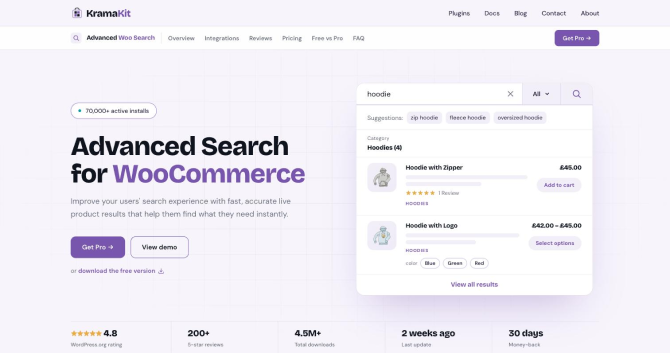
Advanced Woo Search by KramaKit is our own plugin, and it does one job: live product search for WooCommerce. More than 70,000 stores run it. On WordPress.org it sits at 4.8 stars, with over 4.5 million downloads so far.
Why it ranks #1: The main reason is coverage. With free and Pro together, it searches title, content, SKU, GTIN, UPC, EAN, ISBN, ID, categories, tags, brands, attributes, custom taxonomies and custom fields (ACF included). You can give every field its own weight, so a product with the word in its title or SKU beats one where the word only turns up somewhere in the description.
Misspelled queries get corrected, and synonyms let “sneakers” find products listed as “trainers”. In Pro, each product variation also appears as its own result with its own price and stock.
Our Experience:
Setup is three steps: install, run the one-time index, and switch on seamless integration. That last option swaps your theme’s search form for the plugin’s, with no template edits or shortcodes. After the first index, product changes sync automatically.
The index lives in your own database, so you don’t pay an external service per query and no license limits how many products you index. Searches run against that index instead of the default WordPress tables, which keeps results fast as the catalog grows.
With Pro, shoppers can also search by attributes, custom taxonomies and custom fields, or type in a GTIN, UPC, EAN or ISBN code. Variations show up on their own, each with its attributes, price and stock, so someone searching for a blue hoodie in XL lands on that exact variation. You also get as many search forms as you want (each with its own sources and filters), quick filter buttons for things like category or brand, AND/OR logic, grid or list layouts, and an “Add to cart” button right in the dropdown. It works alongside WPML, Polylang, Elementor, Divi, Dokan, WCFM, MultiVendorX, B2BKing and more than 30 other plugins.
Strengths
- Built specifically for WooCommerce product search
- Searches SKUs, GTINs, attributes, taxonomies, custom fields and variations
- Relevance ranking with adjustable field weights
- Typo correction, synonyms and word stemming
- Self-hosted index with no product limits
- Add to cart directly from live search results (Pro)
Limitations
- Attribute, custom field and variation search and the add-to-cart button need Pro
- Doesn’t add faceted filters to shop pages
Price:
- Free version available
- Pro plans start at $79/year for 1 site, with lifetime licenses available
- 30-day money-back guarantee
2. FiboSearch
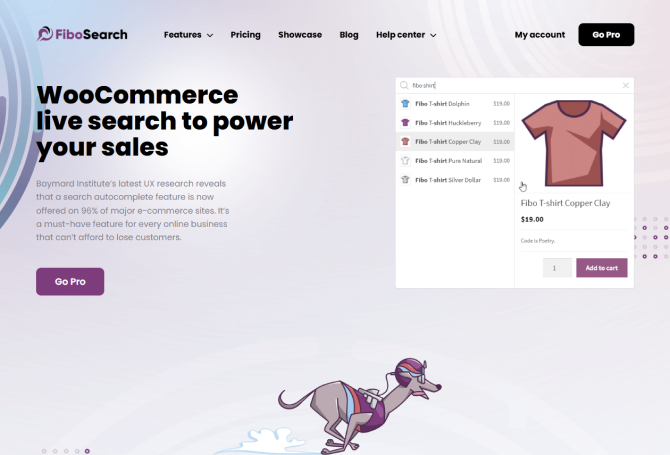
FiboSearch, formerly AJAX Search for WooCommerce, is used by more than 100,000 stores.
Why it ranks #2: It’s quick: FiboSearch says its Pro engine answers in about 0.2 seconds on average, and the dropdown looks good. Hover over a result and a side panel shows the product details. On phones, the search takes over the whole screen.
We put it second because of the pricing model. Pro licenses are limited by product count as well as by sites. The Personal plan covers 10,000 products, so a single store with, say, 30,000 products already needs a bigger plan.
Our Experience:
Even the free version gets you a long way. It searches titles, both descriptions and SKUs, puts images and prices in the dropdown, and suggests matching categories and tags. In a lot of popular themes it takes over the search form by itself, so there’s nothing to set up.
Fuzzy search, synonyms, attribute and custom field search, variation SKUs and brands are all Pro features. If shoppers search by product name, free FiboSearch is enough. If they search by model number or spec, budget for Pro.
Strengths
- Fast autocomplete with images, prices and SKUs
- Details panel with a product preview on hover
- Mobile-friendly overlay search
- Automatic integration with many popular themes
- Fuzzy search and synonyms in Pro
Limitations
- Attribute, custom field and fuzzy search are Pro-only
- Pro plans are capped by product count (10,000, 50,000 and 150,000 products per site)
- Annual renewals are needed to keep updates and support
Price:
- Free version available
- Pro starts at $59 for the first year (1 site, up to 10,000 products), with renewals at a 15% discount
3. SearchWP
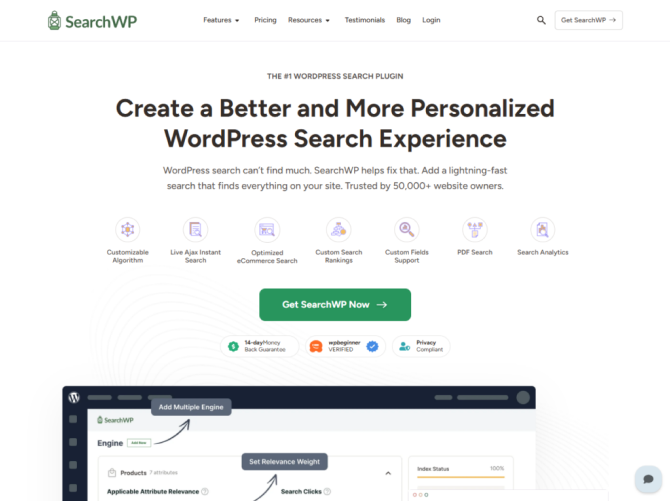
SearchWP is a premium WordPress search engine used on 50,000+ sites. It builds its own index and gives you fine control over ranking.
Why it ranks #3: You can tune ranking in detail. Set weights for titles, content, taxonomies and custom fields, run separate search engines for different parts of the site, and add rules to promote or hide results. It also indexes PDFs and Office files, which helps if your products come with spec sheets or manuals.
It sits third because it was built for WordPress content in general. The WooCommerce integration only comes with the Pro plan, and a product-style dropdown takes extra work.
Our Experience:
The admin is easy to read. Pick your content sources, move the weight sliders, and SearchWP reindexes in the background. If your store also runs a blog, a knowledge base or a resource library, SearchWP can search all of it in one place.
The core plugin has no free version, and the Standard plan leaves out WooCommerce, so most stores end up on Pro. Live results need a separate free add-on, and changing how results look usually means editing theme templates.
Strengths
- Detailed relevance and weighting controls
- Multiple search engines per site
- Indexes PDFs, Office documents and custom database tables
- Search metrics and visitor insights in Pro
- Integrations with WPML, Polylang, Meta Box and more
Limitations
- No free version of the core plugin
- WooCommerce integration requires the Pro plan
- Product-focused live results need extra setup or code
- Listed prices are introductory, and renewals are charged at full price
Price:
- No free version (a free Live Ajax Search companion plugin is available)
- Standard: $99 for the first year on one site, and it doesn’t include WooCommerce
- Pro: $199 for the first year on up to 3 sites, WooCommerce included. Renewal is $399
4. Search & Filter

Search & Filter is about filters more than search. Shoppers use it to narrow a product list by category, attribute, price or a custom field. The team behind it has been at this for 10 years and says it has over 50,000 active users.
Why it ranks #4: If your customers shop by size, material, brand or price, good filters are worth as much as a good search box. Pro has a visual query builder and hides filter values that would return zero products. It also keeps its own index, so even complicated filter combinations load quickly.
We ranked it fourth since there are no live suggestions and no typo tolerance. In practice, most stores run it alongside a separate search plugin.
Our Experience:
Building a filter takes a few steps: create a query, add checkboxes, dropdowns or range sliders, and connect it to your shop page or a custom grid. It works with WooCommerce, ACF, Elementor, Divi, Beaver Builder and WPML.
Matching the filters to your theme’s product grid takes longer, especially with page builder layouts. Test it on staging before it goes on a live shop page.
Strengths
- Faceted filtering for WooCommerce products
- Filters by taxonomies, attributes, custom fields and price
- Dynamic options that hide empty filter values
- Integrations with ACF, Elementor, Divi, Beaver Builder and WPML
- Entry plan is $49/year
Limitations
- Not a live autocomplete search plugin
- You’ll probably want a separate search plugin next to it
- Getting it to match a page builder layout takes some work
Price:
- There’s a free version, but it only does basic search and filter forms
- Pro: $49 a year for one site
- Professional: $99/year for 3 sites; Developer: $219/year for unlimited sites
5. Ivory Search
Ivory Search, formerly Add Search To Menu, is a lightweight WordPress search plugin. You can create as many search forms as you want and put them anywhere.
Why it ranks #5: It’s the cheapest option here. The free version already searches WooCommerce products, supports live search and lets you configure each form separately, say one for products and one for blog posts.
It ranks fifth because WooCommerce basics sit in the top tier: SKU search, keyword stemming and hiding out-of-stock products all need Pro Plus. The plugin was designed for general WordPress search.
Our Experience:
Setup is quick. The plugin can drop a search form into your menu, and each form has its own include and exclude settings. For a small store or a content site that sells a few products, that’s enough.
On a larger catalog you’ll miss field weighting and typo correction, and the live results show less product detail. Pick it when you need simple, configurable forms on a tight budget.
Strengths
- Unlimited search forms with separate settings
- Free WooCommerce product search and live search
- Search forms in menus, widgets and shortcodes
- Cheapest Pro plan on this list
Limitations
- SKU search and out-of-stock exclusion require Pro Plus
- Fewer relevance and ranking controls than product-focused plugins
- Made for general WordPress search
Price:
- Free version available
- Pro: $19.99/year
- Pro Plus (with WooCommerce SKU search): $49.99/year
6. Ajax Search Pro

Ajax Search Pro by WPDreams is a live search and filter plugin in active development since 2013. The developers report 100,000+ sites and a 4.83-star average from 900+ reviews.
Why it ranks #6: Nothing else here gives you as many options: 400+ settings, 100+ prebuilt themes, four result layouts, built-in filters (checkboxes, sliders, date pickers) and an index table for large catalogs. It searches products, posts, custom fields and even PDF and Office file contents. It’s also one of the few still sold with a lifetime license.
With this many settings on one screen, a clean product search takes longer to configure than with a WooCommerce-first plugin.
Our Experience:
You can make the search box and results look almost any way you like without CSS, and that’s its strongest point. Built-in statistics show what visitors search for, and the optional Search AI tools help with setup and finding synonyms.
On a WooCommerce store, expect to spend time setting up product sources, variations and result templates. Some people enjoy that. If you want good results in a few minutes, a WooCommerce-first plugin gets you there faster.
Strengths
- Extensive design and layout options
- Built-in filters and search statistics
- Searches products, custom fields and file contents
- Index table and caching for large catalogs
- Lifetime license option
Limitations
- The large number of settings creates a learning curve
- Not built specifically for WooCommerce
- 14-day refund window, shorter than most alternatives
Price:
- Free version available (Ajax Search Lite)
- Pro from €39/year, or €99 one-time for a lifetime license on 1 site
7. Relevanssi

Relevanssi is one of the oldest WordPress search plugins. The free version has 100,000+ active installs and 7.7 million+ downloads.
Why it ranks #7: It swaps WordPress’s default search for a relevance-based engine and searches custom fields, which covers WooCommerce SKUs and ACF data. Premium adds PDF indexing, taxonomy term and user profile search, and multisite search. Every Premium license covers unlimited sites, which agencies will like.
It ranks last for WooCommerce because it was built for WordPress posts and pages. Live results need a separate plugin, there are no product result layouts, and the developers say advanced setups need PHP and template work.
Our Experience:
Results come back ordered by relevance, and adding custom fields or taxonomies to the index takes a few settings. The docs and knowledge base are thorough, and developers get plenty of hooks.
On a typical WooCommerce store, you still have to sort out live search, product display and variations yourself. It fits best on content-heavy stores where posts, guides and products all need to show up in one search.
Strengths
- Mature, relevance-based search engine
- Searches custom fields, including SKUs
- PDF, user and taxonomy search in Premium
- Unlimited sites on every Premium license
- Developer-friendly hooks and filters
Limitations
- No live search without an additional plugin
- Not designed specifically for WooCommerce
- Advanced customization requires PHP knowledge
Price:
- Free version available
- Premium: €120/year for unlimited sites, or €402 one-time for a permanent license
Which One Should You Pick?
Which plugin fits depends on how your shoppers search. Stores where people browse by size, brand or price get more from Search & Filter’s filters. If your blog and docs need to be searchable next to your products, SearchWP and Relevanssi handle both, and Ajax Search Pro suits anyone who wants full control over design and a one-time payment.
Popularity doesn’t tell you whether a plugin searches the data your customers type. Check four things before you buy: SKU search, attribute search, variations and typo correction. Then check which plan those features are on.
Of the best WooCommerce search plugins on this list, the one we’d pick for most stores is Advanced Woo Search. It searches every type of product data, ranks results by relevance, fixes typos, shows individual variations and runs on a self-hosted index with no product limit. Start with the free version and upgrade when your catalog needs it.
Install Advanced Woo Search today and test it on your own catalog. The free version takes a few minutes to set up.
Related articles: