

Table of Contents
A well configured WooCommerce product filter can seriously improve your product discovery. Plus, make large catalogs easier to browse, increase conversions, and even create new SEO opportunities.
But when filters are used poorly, they just do the opposite.
A bad filtering setup can overwhelm shoppers, slow down category pages, break the mobile experience, and create serious SEO issues like duplicate URLs, wasted crawl budget and thin filtered pages.
Thus if you also use a WooCommerce product filter on your store, here are the most common mistakes we’ve seen others make:
Just so you know avoiding these mistakes can make a measurable difference in both user experience and search performance.
So without any further ado, let’s get started!
Top WooCommerce Product Filter Mistakes That Hurts Sales
1. Showing Too Many Filters on Every Category
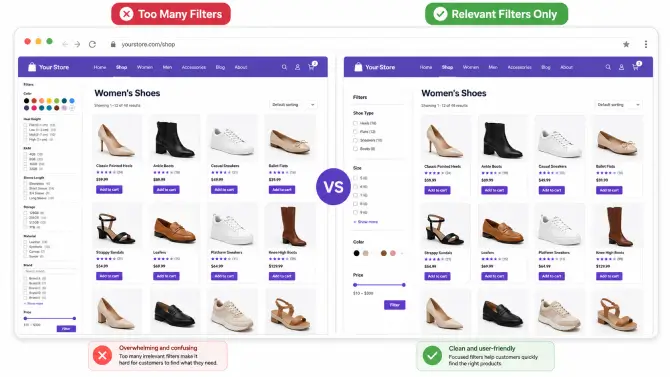
One of the biggest mistakes is displaying the same full filter set across the entire store.
For example, a store might show filters for color, size, material, brand, CPU, RAM, sleeve length, and heel height on every category page – even when half of them are irrelevant. In the clothing category, technical filters make no sense. In the electronics category, apparel filters are just noise.
This creates three problems:
- Shoppers feel overwhelmed
- Relevant filters become harder to find
- The sidebar takes up too much attention
A good WooCommerce product filter setup should be context-aware. Different categories should display different filters based on the products being sold. A shoe category may need size, brand, and color. A laptop category may need RAM, storage, processor, and screen size.
The goal is not to show more filters. The goal is to show the right filters.
How to fix it:
Map filter groups to specific categories or product types. Keep the sidebar focused and prioritize the filters customers actually use when making a buying decision.
2. Not Showing Product Counts or Empty States Properly
Filters work best when shoppers understand what will happen before they click.
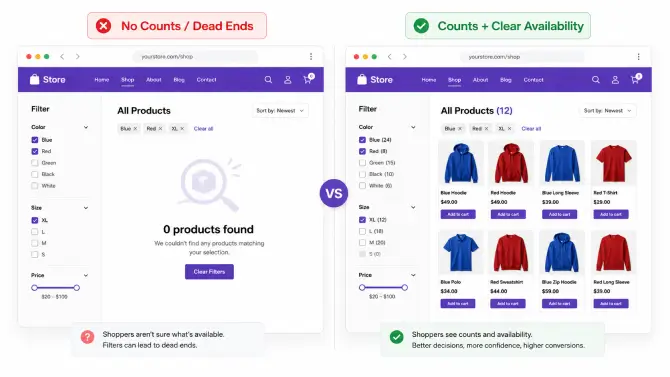
If users see options like “Blue,” “XL,” or “Nike” without any product counts, they have no clue whether those filters will reveal 50 products, 5 products, or none at all. That uncertainty slows decision-making.
Even worse, some stores leave empty filter values visible. A shopper clicks a filter, lands on a zero-results page, and now has to backtrack.
This makes the WooCommerce filter experience feel unreliable.
Product counts are especially useful on large stores where customers are exploring multiple options. They reduce friction and help guide the shopper toward meaningful choices.
How to fix it:
Show live or accurate product counts next to filter values. Hide unavailable values where appropriate, or clearly disable them visually instead of letting users click into dead ends.
This is a simple UX improvement, but it often has a direct effect on engagement and conversions.
3. Ignoring Mobile Filter UX
A WooCommerce product filter that works on desktop can still fail badly on mobile.
This is one of the most common mistakes in eCommerce.
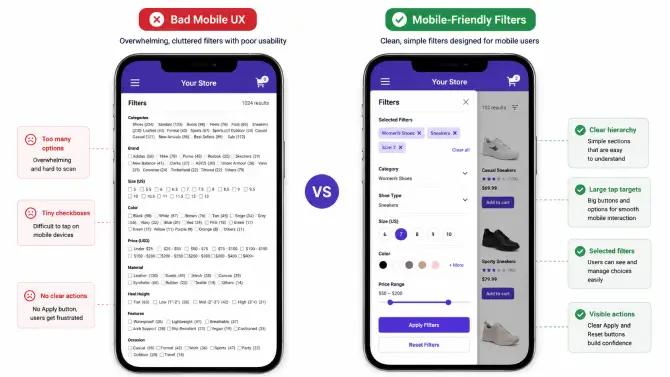
On a small screen, long sidebars, tiny checkboxes, and hard-to-close overlays quickly become frustrating. If users cannot easily open, apply, review, and clear filters on mobile, they are more likely to abandon the session.
Common mobile filtering issues include:
- Filter panels that take too many taps to use
- No visible “Apply” or “Reset” button
- Selected filters hidden from view
- Oversized filter lists that force endless scrolling
- Modals that block too much of the screen
Since mobile traffic is dominant for many stores, poor mobile filtering hurts both conversions and user satisfaction.
How to fix it:
Use a mobile friendly filter drawer or modal, keep the interaction simple, show active filters clearly, and make Apply/Reset actions easy to tap. Also, test with real thumbs on real devices.
4. Using Slow or Poorly Optimized AJAX Filtering
Speed matters. Even a well designed product filter for WooCommerce can damage performance if the filtering system is slow.
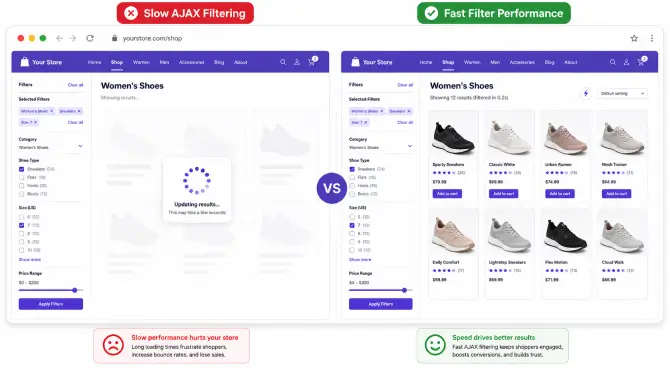
Shoppers expect filtered results to update quickly. If each selection triggers a laggy request, a page reload, or a long spinner, users start losing trust. On large catalogs, this issue becomes even more visible.
Slow filtering usually comes from one or more of these issues:
- Heavy database queries
- Poorly optimized AJAX requests
- Too many filter combinations loaded at once
- Lack of caching
- Bloated theme or plugin interactions
A slow WooCommerce product filter hurts more than usability. It can increase bounce rate and make the entire store feel lower quality.
How to fix it:
Use a filtering solution that is designed for performance, especially on larger catalogs. Optimize queries, minimize unnecessary requests, test with realistic catalog sizes, and measure speed on category pages where filtering is used most heavily.
5. Creating Messy or Unclear Filter URLs
Filter URLs matter more than many store owners realize.
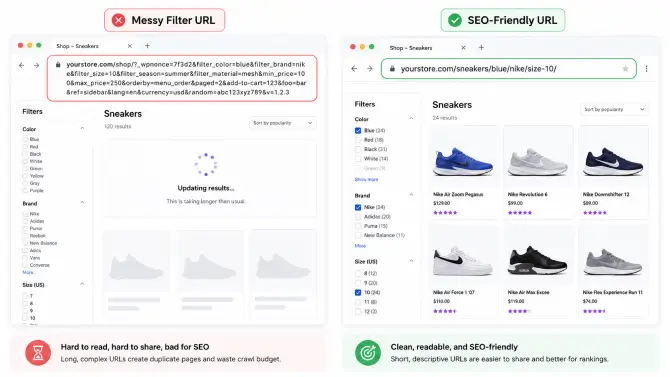
Some WooCommerce product filters generate long, confusing query strings full of unnecessary parameters. These URLs are hard to share, hard to understand, and often create SEO headaches.
For example, a clean filtered URL might suggest a clear search intent, while a messy parameter-based URL can look bloated and inconsistent. When many variations are generated, internal duplication increases and site structure becomes harder for search engines to interpret.
This is especially important when filtered pages are part of a broader SEO strategy.
How to fix it:
Use SEO friendly URL structures where possible. Keep filter URLs readable, consistent, and logically organized. If your store creates valuable landing pages from filtered combinations, those URLs should look intentional.
Clear URLs are better for users, easier to analyze, and safer from an SEO perspective.
6. Letting Search Engines Index Every Filter Combination
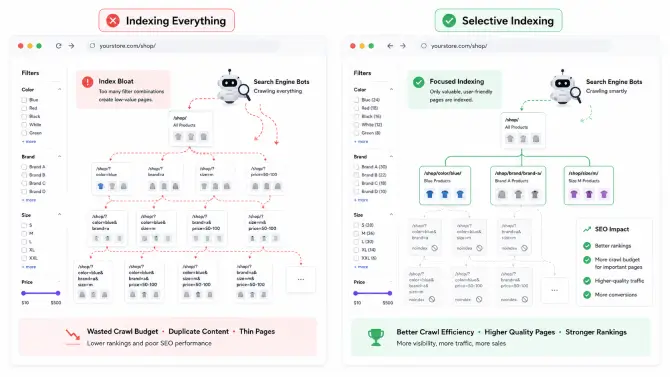
Faceted navigation can create thousands of URL combinations.
If search engines are allowed to crawl and index every possible combination of size, brand, price, color, and category, your store can end up with a massive amount of low-value or duplicate pages.
That leads to common SEO problems such as:
- Crawl budget waste
- Duplicate or near-duplicate pages
- Thin content
- Index bloat
- Diluted ranking signals
Not every filtered page deserves to be indexed. In fact, most of them probably should not be.
How to fix it:
Decide which filtered pages have real search value and which do not. For the rest, use a clear indexing strategy. That may include no-index rules, canonical logic, or limiting which filter combinations can become indexable landing pages.
A strong WooCommerce product filter SEO strategy is not about indexing everything. It is about indexing the right pages.
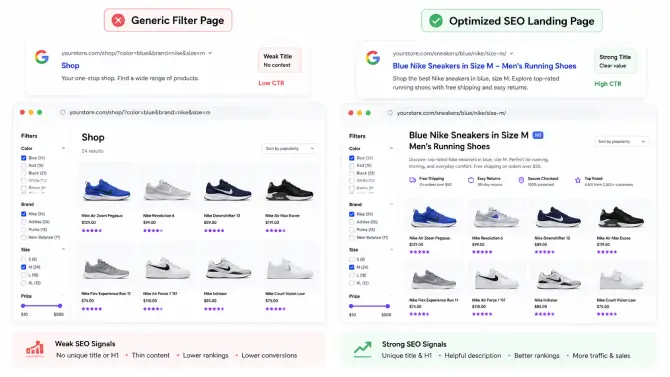
7. Missing Custom Title Tags, H1s, and Meta Descriptions for Valuable Filtered Pages
This is the mistake that limits the SEO upside of filtered navigation.
Some filtered pages genuinely deserve to rank. For example, category + brand or category + key attribute combinations may match real search demand. But if those pages use generic titles, generic H1s, or no unique metadata at all, they miss the opportunity.
A filtered page that targets a real search intent should not look like a technical byproduct. It should look like a purposeful landing page.
For example, if a shopper is browsing a filtered collection with strong intent, the page can benefit from:
- Custom SEO title
- Targeted H1
- Relevant meta description
- Optional descriptive text where appropriate
This helps both search engines and users understand the page.
How to fix it:
Identify high-value filtered pages and give them custom metadata. Build a system that lets you assign SEO titles, H1s, and descriptions to the filter combinations that matter most.
If your store depends on category discovery, this can turn a basic WooCommerce product filter into a more strategic SEO asset.
Final Thoughts
A good WooCommerce product filter should help shoppers find products faster without creating friction, confusion, or SEO problems.
The most effective filtering systems are not the ones with the most options. They are the ones that are relevant, fast, mobile-friendly, and aligned with a smart SEO strategy.
If you avoid the seven mistakes above, your store will be in a much better position to improve product discovery, keep users engaged, and turn filtered pages into a real business advantage.
And if you want to evaluate different solutions before choosing one, check out BeRocket’s WooCommerce product filter comparison for a detailed breakdown of features, SEO options, and use cases.
You May Also Like: