


Table of Contents
If you want to build a business directory, local listing site, or classified ads platform on WordPress, Directorist is one of the most capable options available. It has been installed on over 20,000 WordPress sites and covers a wide range of directory use cases from a single plugin.
This directorist review covers what Directorist does, how it works, who it suits best, where it falls short, and whether it’s worth your money.
What Is Directorist?

Directorist is a free WordPress plugin that gives you the tools to build a fully functional directory website. That includes listing submission forms, search and filter functionality, map integration, category pages, single listing pages, and monetization options.
The core plugin is available for free on WordPress.org. Premium extensions are sold separately through directorist.com, and can be bundled together under paid plans. The team behind Directorist is wpWax, which also builds FormGent, HelpGent and Legal Pages.
Unlike some directory tools that are designed around one specific use case, Directorist is built to be flexible. You can use it for a local business directory, a job board, a real estate listings site, a classified ads site, or a staff directory – all using the same base plugin with different extensions enabled.
Exploring Directorist’s Feature Set

Drag-and-Drop Directory Builder
Directorist includes a visual builder for designing your listing submission forms and single listing display pages. You add the fields you want, arrange them in the order you need, and the front-end output updates accordingly. This gives you control over what information a listing shows and what a submitter is asked to fill in.
For most directory use cases, this removes the need for a developer to configure how listings look and what data they capture.
Search and Filter
The built-in search lets visitors filter listings by keyword, category, location, and custom fields. Directorist AI Search, available as an extension, adds a semantic search layer that understands the meaning behind a query rather than just matching exact keywords. This is useful if your directory has a large number of listings or visitors who search with varied language.
Map Integration
Directorist supports Google Maps and OpenStreetMap out of the box. Listings with location data show up as pins on a map, and visitors can search by radius from a specific location. This is a standard expectation for any local business directory, and Directorist covers it without requiring a separate plugin.
Monetization Options
The Pricing Plans extension lets you charge listing submitters for adding or upgrading their listing. You can offer free tiers, paid tiers, and featured listing options. This is the primary way most directory site owners generate revenue, and Directorist handles it without needing WooCommerce or a third-party payment setup for the basics.
Page Builder Compatibility
Directorist works with Gutenberg blocks, Elementor, and Divi. This means you can integrate directory content into your existing pages without switching your site-building workflow. Advanced builder integrations are also in development for deeper customization within each page builder environment.
Directorist AI
Directorist AI is a tool built into the directory setup process. It reads what kind of directory you are building and generates an appropriate field structure, labels the fields, and sets up both the submission form and the single listing layout for you. This is useful for first-time users who are unsure how to structure their directory.
Is Directorist Beginner-Friendly?
Directorist is not the simplest plugin to get started with. The first-time setup installing the plugin, understanding how extensions interact with the core, configuring the builder, and assigning directory pages, takes more time than a basic WordPress plugin would.
The Directorist AI feature reduces this for users who are starting from scratch. For those who want more control, the builder is detailed and logical once you understand how it works.
The documentation at directorist.com covers most setup scenarios, and the support team is responsive. If you have specific technical requirements or a complex directory setup, the team also offers a Done For You service where they build the directory for you directly.
Understanding Directorist Pricing
The core Directorist plugin is free. Extensions and themes are paid, and they can be purchased individually or as part of a bundle plan.
Bundle plans include a Starter option and higher tiers with more extensions included. Lifetime deals are available, which can make Directorist significantly cheaper over time compared to paying recurring SaaS fees for a hosted directory platform. Individual extensions renew annually.
Pricing is available at directorist.com. [verify exact pricing tiers before publishing]
The Good and the Bad of Directorist

Pros
- Free core plugin with meaningful out-of-the-box features.
- Flexible enough to handle multiple directory types in one installation.
- Lifetime deal available – good long-term value.
- Built-in AI to accelerate initial setup.
- Active development cycle with regular updates.
- Responsive support and an optional done-for-you service.
Cons
- Initial setup has a learning curve for non-technical users.
- Some advanced features require premium extensions.
- Occasional bugs reported by users, as with any actively developed plugin.
- Deep customization may require developer help.
Is Directorist the Right Directory Plugin for Your Needs?

Directorist works well for:
- WordPress developers and agencies building directory sites for clients who want a one-time setup with low ongoing cost
- Directory site owners who want full ownership of their platform and data, without depending on a hosted SaaS tool
- Non-technical users who have a clear idea of what their directory should do and are willing to spend time on initial configuration or use the Done For You service
It is less suited for someone who wants a hosted, zero-maintenance directory solution out of the box. Directorist is a self-hosted WordPress plugin, you manage hosting, updates, and site performance yourself.
Where Directorist Stands Among Directory Plugins
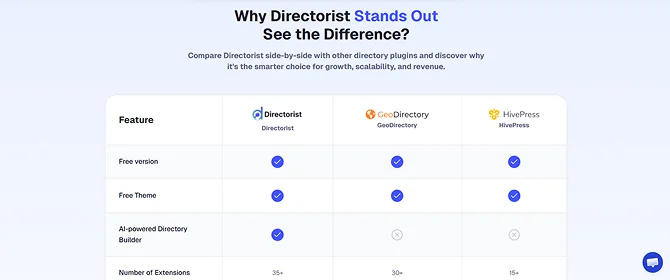
The main alternatives in the WordPress directory plugin space include GeoDirectory and HivePress. GeoDirectory is strong for location-heavy use cases and has deep map integration, but it can be more expensive depending on the extensions you need. HivePress is a solid option for marketplace-style directories and offers a clean design, though it has fewer monetization options in the free version.
Directorist sits between these two in terms of scope and complexity. It covers more use cases than HivePress by default and is generally more affordable than GeoDirectory at comparable feature levels.
If you are comparing Directorist to hosted, non-WordPress solutions like Brilliant Directories, the main difference is ownership and flexibility versus ease of operation. Hosted platforms handle maintenance for you but lock you into their infrastructure and monthly costs. Directorist gives you full control but requires self-management.
Final Verdict
Directorist is a well-built, actively maintained WordPress plugin with genuine depth. The free core is more capable than most competing free tiers, the extension library covers the features most directory site owners will need, and the lifetime pricing makes it a strong long-term value for those building on WordPress.
The setup requires some patience, but the documentation, support team, and built-in AI setup tool all reduce the initial friction. For WordPress users who want a self-hosted directory platform that can grow with their needs, Directorist is worth serious consideration.
You May Also Like: