


Table of Contents
Want to make it effortless for sponsors to register for your event or project?
Even in 2026, hundreds of events, projects, and creators organize sponsorships the “old-school” way. Use emails or a generic contact form for sponsorships. And that’s not just inconvenient, it’s like a missed opportunity to impress your potential partners right from the start.
So if your sponsorship process is also slow and difficult, it’s time to step forward and make a sponsorship form.
The best part? With a WordPress site and form builder, creating a sponsorship form is super fast. You don’t even need to write a single line of code. All these things can be done with ARForms, an all-in-one WordPress form builder plugin.
In this blog, I’ll show you how to create a professional sponsorship form in WordPress step by step. So let’s dive in!
Quick Steps to Create a Sponsorship Form
- Install and activate ARForms on your WordPress site.
- Enable the payment module if you want to collect sponsorship payments.
- Use the drag and drop builder to create a sponsorship form.
- Add fields to collect sponsor details: name, email, company, sponsorship level, messages, and file uploads.
- Configure payment gateways like PayPal or Stripe (optional).
- Customize form design and set up automated notifications for sponsors and admins.
- Embed the form on your sponsorship page for easy access and submissions.
- Now automate your sponsorship management, save time and boost conversions.
Why Having a Dedicated Sponsorship Form Is a Must
Trying to manage sponsorships without a dedicated form is like trying to run a business without money. Having a dedicated sponsorship form can save you from the hassle of managing emails, spreadsheets, and follow ups.
On the other hand, a WordPress sponsorship form can easily:
- Create a professional first impression: Sponsors instantly see you’re organized and serious when you have a dedicated sponsorship request form.
- Save time: With a good sponsorship form, no need to send manual emails asking for the same info again and again.
- Keep everything in one place: When someone fills out the online sponsorship forms, all form entries are neatly organized. Plus, they are easy to track and export if needed.
- Boosts conversions: The simpler you make it for sponsors, the more likely they are to say yes.
- Collect the payment right away: You can also add multiple payment gateways in your online sponsorship form to collect money right away.
- Ask specific questions: Unlike using contact forms for collecting sponsorships, a dedicated sponsor registration form lets you ask specific questions, such as “What sponsorship level do you need?” and so on.
In short, if you want your sponsors to actually stick around (and sign up quickly), a dedicated sponsorship form is important.
How to Create a Sponsorship Form in WordPress with ARForms
Step 1: Install and Activate ARForms Plugin
To create a sponsorship form in WordPress, first you have to install and activate ARForms.
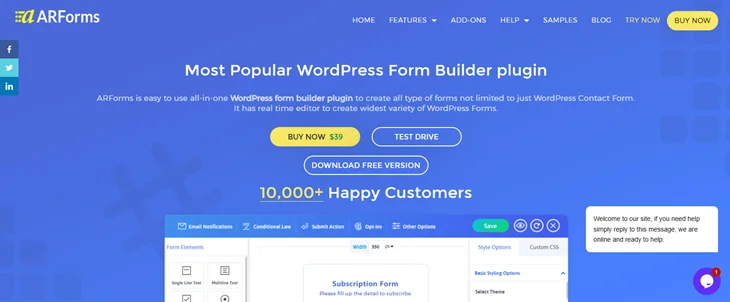
ARForms is an all-in-one WordPress form builder plugin that allows you to create all kinds of online forms visually. It comes with a super friendly drag and drop form builder and a wide range of field types to create your online sponsorship form with ease.
Moreover, here’s why you should go with ARForms as well to create your sponsorship form in WordPress:
- Over 50+ fully designed sample forms and templates.
- Extensive styling options.
- Easy to embed third party media files like YouTube videos.
- 33+ advanced form fields.
- More than 24 powerful third party integrations.
- Powerful conditional and math logic.
- Autosave form progress.
- Easy form entries management and a lot more!
Now that we had enough of ARForms mind blowing features, let’s spare a quick glance on how to install it:
- Firstly, go to the ARForms website and download the free version.
- Go to your WordPress dashboard > Plugins > Add New > Upload.
- Now click on “Install Now” and later click on “Activate.”
That’s all!
If you’re stuck somewhere, you can take a look at its user friendly guide to get started with ARForms.
Step 2: Create a New Form for Sponsorships
Once ARForms is activated, it’s time to create your first WordPress sponsorship form.
For that, first go to your WordPress dashboard > ARForms > Manage Forms > Add New Form.
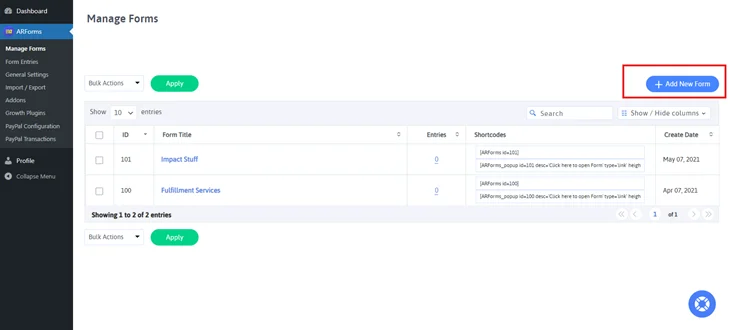
So now that you are in, you’ll see three options to get to the ARForms drag and drop live form builder:
- Blank Form
- Templates
- Sample Forms
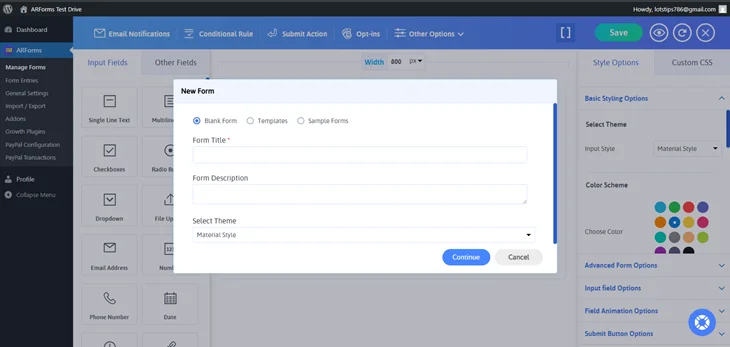
Now you can also go with ARForms pre designed templates or sample form if you want to save time. Yet here, I’ll show you how easy it is to create a sponsorship form even from scratch.
So let the blank Form be selected as it is. Then give your online form a clear name like “Event Sponsorship Form” or “Sponsor Registration Form” so it’s easy to remember later.
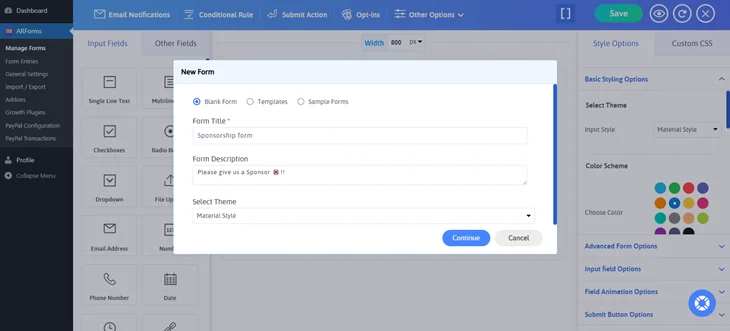
At last, hit the “Continue” and you’ll be redirected to the ARForms simple drag and drop form builder.
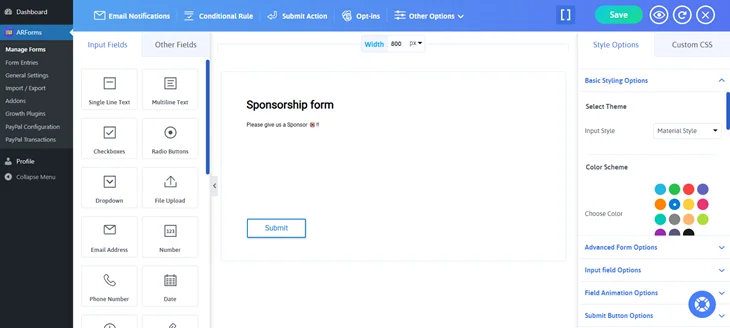
Step 3: Add Sponsorship Form Fields
Now comes the fun part: adding form fields in our newly created sponsor form.
ARForms comes with 33+ advanced form fields, as we said before. Thus, you can easily collect the exact information you need from your sponsors.
All you have to do is simply drag the field you want and drop it in your blank form. Now, here are some common form fields you can include in your WordPress sponsorship form:
- Sponsor First and Last name (Single line text fields).
- Email Address and Phone Number (email and phone number form fields).
- Sponsorship Level. (Dropdown).
- Company Name. (Single line text field).
- Message or notes for just in case. (Multiline text field for sponsors to share their preferences).
- File Upload. (If sponsors want to submit logos or documents).
- Payment Options. (If you’re accepting payments online).
Moreover, ARForms comes with powerful conditional logic to show or hide fields based on user choices.
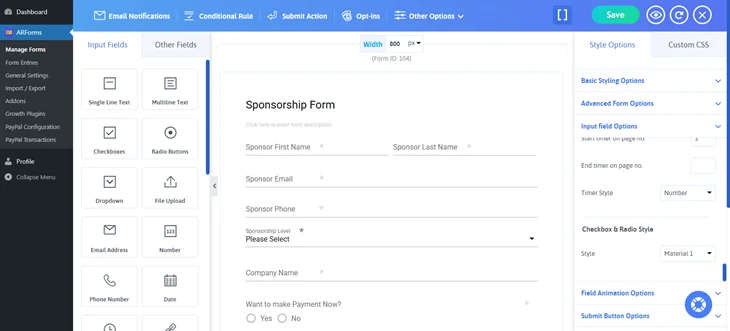
This way, you can show the payment fields only if the sponsor selects an option to pay online.
Step 4: Customize Form Design & Configure Notifications
After setting up all the form fields, now’s the time to make our online sponsorship form look professional.
ARForms comes with a wide range of extensive styling options to design your form the way you want. You can easily customize and personalize your online sponsorship form to match your brand’s style.
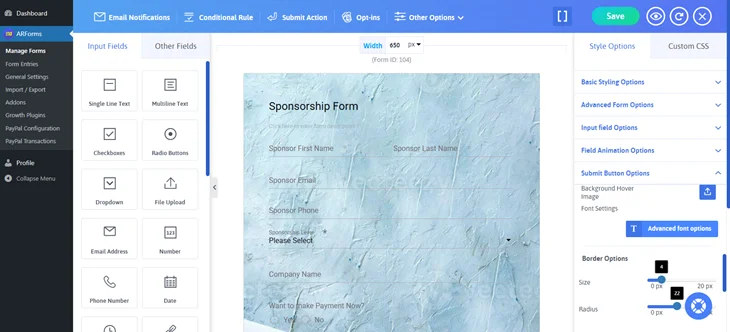
Once your form looks perfect to match with your business website, let’s set up automated email notifications to get instant alerts when a sponsor submits the form.
The best part, you can also send a confirmation email to the sponsor automatically, because who doesn’t love instant confirmation that their form is submitted?
For that, simply go to the Email Notification option on the top left bar of your ARForms form builder.
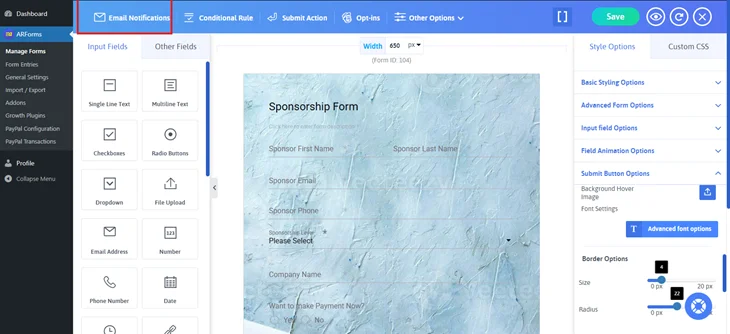
Once you click it, a pop up will show up. Now simply tick on “Send an automatic response to users after submission.”After that, you can easily personalised the automated confirmation email’s subject and message for each sponsor.
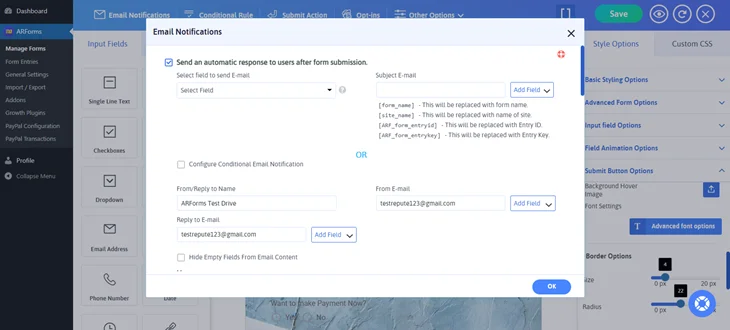
After this if you scroll down a bit in the same popup for Email Notifications, you will have options to send automated emails to admin (You) after each sponsorship form submission.
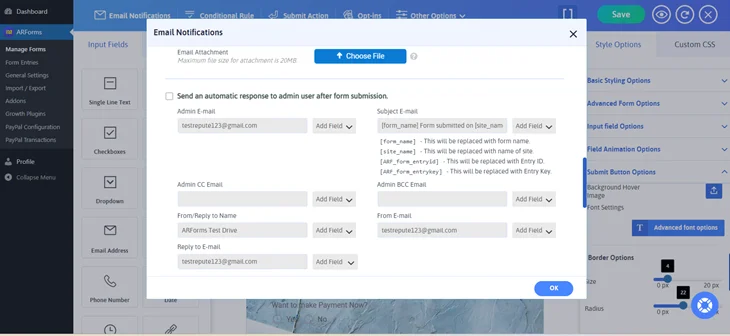
In the same way, click here on “Send an automatic response to admin users after form submission,” and that’s all!
After setting all this, you can also see how your form will appear in reality before even going live. Just click on the eye icon on the top right side of your form builder and you’ll get to see the quick live preview of your online form.
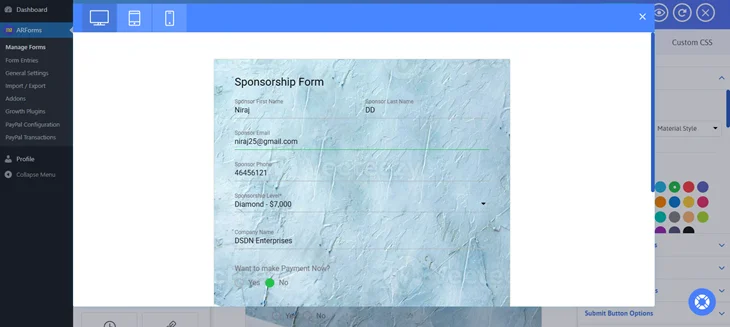
Now your sponsorship form is (almost) ready to go!
Wait, did we say almost? Yes, because if you have added an option for online payment, you must configure it too. So let’s see how it’s done.
Step 5: Set Up Payments (Optional)
This step is completely skippable if you haven’t given the option to pay online. But if you did, you are most welcome here. ARForms provides you with the option to configure multiple payment gateways such as:
- PayPal
- Stripe
- Authorize.Net
- Razorpay
- PayPal Pro
- PayFast
- Mollie & many more
And for that, you will need the activate addons for your desired payment gateway or if you got yourself ARForms Pro, you don’t have to spend a single extra penny on anything.
So just go to “Addon” section, search your favourite payment gateways and activate them.
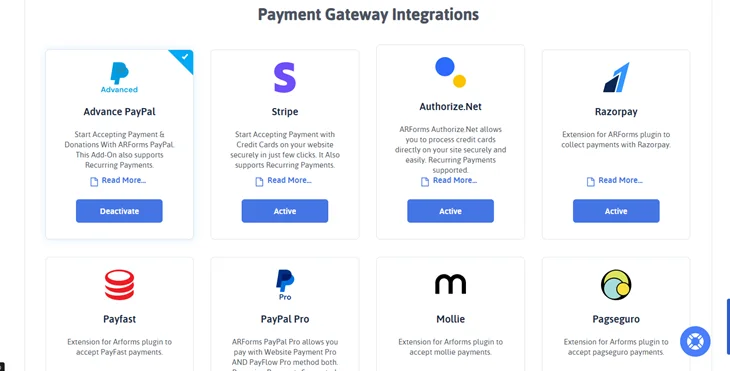
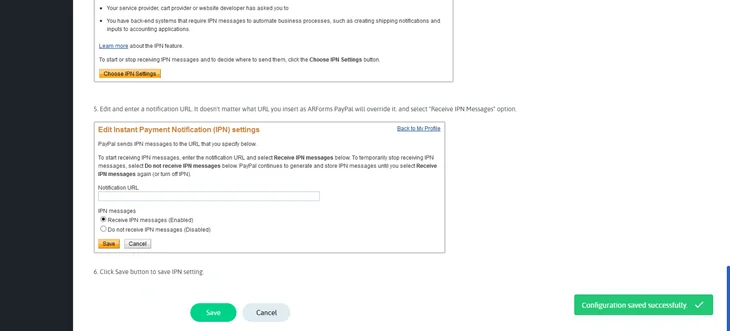
Now it’s time to configure your WordPress sponsorship form with, for example, PayPal. Thus, after activating it, we are sure you’ll see new options in your ARForms menu like this:
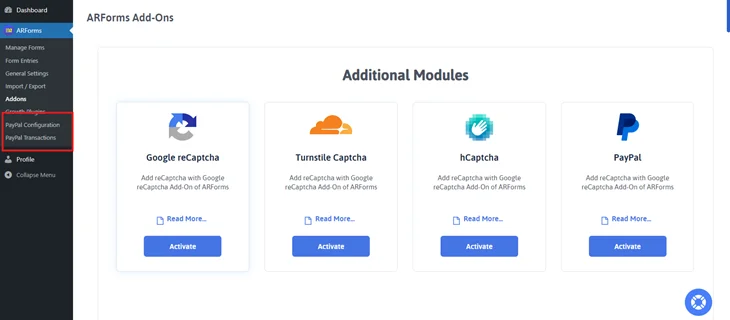
First, go to “PayPal Configuration” or whatever payment gateway you selected.
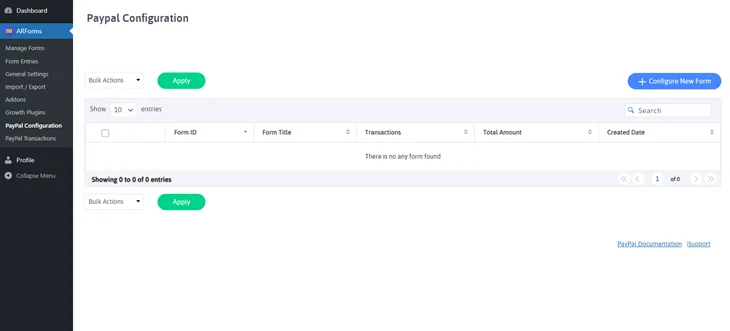
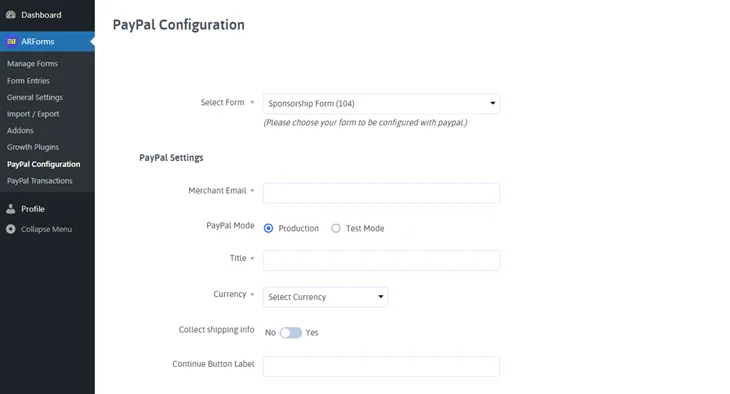
Here, click on “Configure New Form”. Once you did, you will have to select the form for which you want the PayPal integration. Furthermore, you’ll see multiple details that you would need to specify.
You can also set “Return Action” and “Email Notification” once the payment is processed.
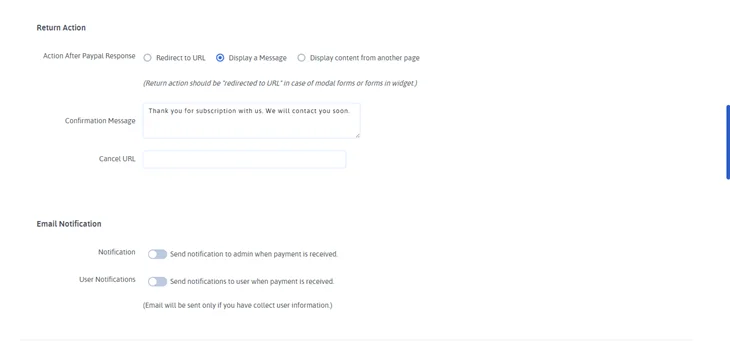
Once all is set, scroll to the end and click on “Save”.
Step 6: Publish the Form on Your Sponsorship Page
Congratulations! Your sponsorship form is fully ready to go live.
Now go back to “Manage Forms” and copy the shortcode of your WordPress sponsorship form.
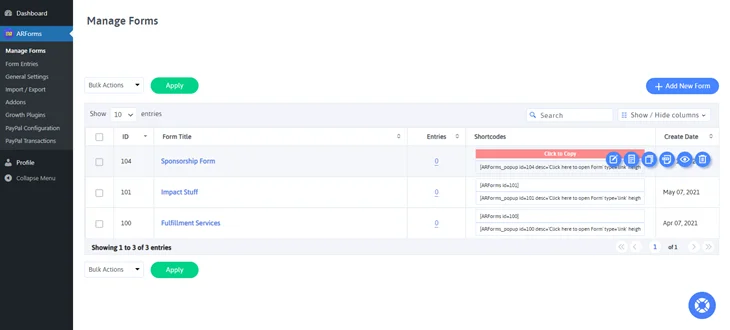
Next, paste the shortcode in your WordPress page or post, wherever you want to display your sponsor registration form.
At last, your professional sponsorship form is now live and ready to collect sponsors.
Build a Smarter & Faster Sponsorship Form with WordPress
Creating a sponsorship form in WordPress is super easy using ARForms. It’s a super simple live form builder that lets you create and design all kinds of online forms effortlessly.
So what are you waiting for? Create your sponsorship form right now with ARForms and make collecting sponsors faster, smarter, and totally stress free.
Always remember, whether it’s for an event, a project or your website, your first impression will always be professional. Also, using the WordPress form plugin, you can always stay organized & impress your potential sponsors from the very first click.
You May Also Like: