

Table of Contents
Do you really know how your WordPress site is performing in search, or are you just guessing and hoping for the best?
In the era of AI, even the best looking website can underperform if it’s not SEO ready. And SEO is never about just stuffing keywords everywhere. From website speed and mobile performance to SEO structure and content quality, everything matters.
In 2026, search algorithms are smarter, user expectations are higher and your competitors are already running full SEO audits. That’s exactly why a complete website SEO optimization test is a must.
In this guide, we’ll walk through exactly how to do a full website SEO optimization test in WordPress, step by step with tool suggestions.
Ready to uncover what’s holding your site back from ranking higher? Let’s dive in!
What Is a Website SEO Optimization Test?

A website SEO optimization test is the process of checking how well it is likely to perform in Google and other search engines.
In simple terms, it is like a monthly health check up of your WordPress site where you use SEO optimization tools to automatically analyze your website’s good points, weak points and where you can improve.
It’s like asking your WordPress website a series of important questions:
- Can Google find my WordPress site easily?
- Is it fast?
- Is the content in it clear?
- Is it safe for everyone?
- Does it work on phones?
The outcome? Regular SEO optimization tests make sure your website stays healthy, visible and competitive in 2026.
Why Should You Run an SEO Optimization Test in WordPress?
Have you ever asked yourself why some sites outrank others, even with similar content? Most of the time, the answer comes down to SEO optimization.
By running a WordPress SEO optimization test on your website, you get a list of “fixes” to make your website perform even better. Plus, listening to SEO optimization test results and working on them even makes Google happy.
Here are some more reasons to run a WordPress SEO optimization test:
- Boosts your search engine visibility.
- Attracts more visitors.
- Finds hidden problems for you to fix.
- Improves user experience.
- Helps you to stay on top of searches and pages.
- Saves time and money by automating it using the best SEO plugins and tools.
Best of all, SEO optimization is like giving your website a monthly check up to keep it healthy, safe and performing at its best.
What Tools Do You Need for an SEO Website Audit in WordPress?
Are you also thinking about how to check every corner of your WordPress site like a Pro? Here is the solution.
Here we introduce you to some of the best tools that make a WordPress SEO audit super easy, along with what they do and whether they’re free or paid:
| Tool | Purpose | Free/Paid |
| Google Search Console | Track indexing, crawl errors and search performance | Free |
| PageSpeed Insights / Lighthouse | Analyze website speed, Core Web Vitals | Free |
| Screaming Frog | Crawl site for SEO issues like broken links & metadata | Free/Paid |
| RankMath / All in One SEO (plugins) | On-page SEO, sitemaps, meta optimization | Free/Paid |
| GTmetrix or Pingdom | Check site speed, performance recommendations | Free/Paid |
| OptimizeCamp | Analyze content for AI visibility and citation readiness. | Paid |
With the right tools, you can easily figure out the issues, optimize performance and make sure your WordPress site is fully prepared for Google and your users.
How to Run a Full SEO Optimization Test For WordPress (Step-by-Step)
Let us walk you through each step one by one. This way, you can understand it in a more easy and approachable way.
Step 1: Run a Site Audit
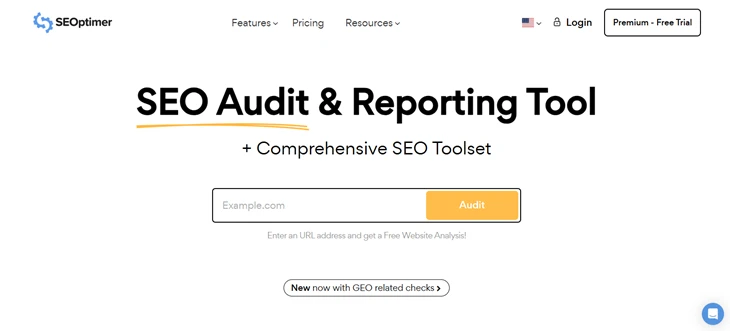
Ever wondered why your site isn’t ranking even after posting great content? A quick SEO audit might have the answer.
After all, you can’t fix what you don’t know is broken.
That’s why you should start with tools like Screaming Frog or free online checkers such as SEMrush’s Free SEO Checker or HubSpot’s Website Grader. Here, you can simply enter your website URL and get a complete overview of issues.
Step 2: Review the Report
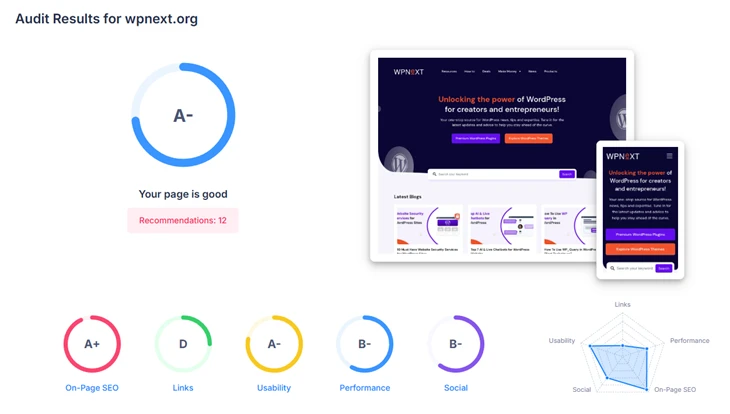
Now once your audit is done, time to look at the reports we got. The tool will generate a score along with a prioritized list of errors and warnings.
Remember, you must focus on high impact problems first, such as:
- Indexing issues
- Mobile usability errors
- Or slow loading pages.
This way, you tackle the most critical issues firsthand before anything else.
Step 3: Use Google’s Tools

Next, check Google Search Console for any crawl errors or “Manual Actions” that could be affecting your rankings.
Then, run PageSpeed Insights to see how Google evaluates your site speed and Core Web Vitals.
This gives you a direct view of how your site performs in the eyes of search engines like Google, Microsoft Bing, DuckDuckGo and more.
Step 4: Implement Fixes

Now it’s time to get into action: Fixing the issues!
For that, you can first start by addressing the most important issues. So here are our top priority fixes when it comes to website SEO optimizations:
- Update Technical Issues: Fix any kind of crawl errors, broken links, and redirect chains you see.
- Improve Content Quality: Improve your content’s readability, add some good volume keywords and always keep your information up to date.
- Improve Your Meta Data: Always keep your titles, meta descriptions, and headings perfect and SEO optimized.
- Improve Site Speed: To boost your site’s speed, compress images, use webp format, get come WordPress caching plugins and also minify your CSS & JS files.
- Mobile Responsiveness: Make sure your site is fully responsive and mobile friendly.
- Good Backlinks: You should focus on getting and building authoritative links to increase your site’s credibility and rankings.
All you have to do is fix these problems step by step. And soon, you’ll see clear improvement over time in your website ranking and performance.
Step 5: Monitor and Re-test

Now, some of you might not know but SEO isn’t a one-time task. SEO is an ongoing process in reality, so here’s what to do to make sure your WordPress site always stays SEO optimized:
- Run SEO Audits Regularly: Perform a full site audit every 6 months or after major updates.
- Track Key Metrics: Always keep an eye on your organic traffic rate, bounce rate, and keyword rankings in Google Analytics.
- Check Search Console: Look for new crawl errors, indexing issues, or manual actions.
- Measure Page Speed & Core Web Vitals: Use PageSpeed Insights to track performance improvements.
- Identify New Opportunities: Always try to look out for pages that can be optimized further or new content gaps to target. Tools like OptimizeCamp can help you identify missing topics, weak coverage, and improve your content’s visibility in AI search.
- Adjust Your Strategy: Now at last, based on the data, you must refine your SEO tactics to continuously improve rankings and conversions
By regularly keeping an eye on these factors, you can make sure your WordPress site always stays SEO optimized and steals the spotlight.
Best WordPress Plugins to Help You Run SEO Tests
Running SEO tests on your WordPress site is easier when you have the right plugins. Here are some of the best WordPress plugins for SEO implementation & testing:
- All in One SEO (AIOSEO): It is one of the best beginner friendly plugins that generates SEO audit reports, TruSEO scores, and actionable recommendations.
- Rank Math: It’s the feature-rich SEO plugin with on-page analysis, keyword tracking, and integration with Google Search Console.
- Yoast SEO: This WordPress SEO plugin is popular for offering content and technical SEO analysis with a super easy to understand traffic light system.
- SEOPress: This is another lightweight and beginner friendly SEO plugin, which is perfect for monitoring on-page SEO and overall website performance.
- WP Rocket: This is not a WordPress SEO plugin, but we also can’t turn a blind eye to it because it improves site speed and performance, which is important for SEO and Core Web Vitals.
These WordPress plugins can act like your personal SEO assistant, helping you continuously every time to optimize your WordPress site and help you fix issues within a minute.
How Often Should You Perform a WordPress SEO Optimization Test?

Now we sure told you to do a full website SEO optimization test on a regular basis, but how often? Till now, we understood one thing clearly: SEO can never be a one-time thing in this competitive market.
That’s why we recommend performing a full WordPress SEO optimization test once a year. Thus, we have got a simple schedule to keep your WordPress website always SEO optimized:
- Regular Audits: Every 6 months is good as far as.
- Tracking Performance: Notice a sudden drop in traffic or rankings.
- Content & Backlinks: Review these quarterly to keep everything fresh and relevant.
- Quick Checks: Check speed, broken links and analytics of your website on a weekly or daily basis for the best outcome.
Conclusion: Keep Your WordPress SEO Health in Check
Ultimately, doing a full website SEO optimization test in WordPress is just like giving your website a regular health check.
From performance, responsiveness to content quality and link audits, these WordPress SEO optimization tests show you what’s working and what’s holding you back.
By following the step by step SEO optimization guide, using the right tools and monitoring results regularly, you can always keep your WordPress website super fast, smooth and ranking higher in all top search engines.
But remember, SEO isn’t a one time task. It’s an ongoing journey and you must be consistent.
You May Also Like:
- A Detailed Guide on Programmatic SEO WordPress
- WordPress Website Launch Checklist (Beginner Guide)
- How to Clear WordPress Cache Without Plugins
Frequently Asked Questions:
How do I test my site for SEO?
To test your website for SEO, you can use a bunch of SEO audit tools and WordPress SEO plugins such as AIOSEO, Rank Math, Google Search Console, or PageSpeed Insights to run a full website SEO analysis.
Is SEO worth it anymore?
Yes! Even in 2026, SEO is worth it for getting organic traffic and converting your visitors into customers. While its tactics surely changed due to the rise of AI, SEO still drives traffic, sales and visibility.
Can I use two SEO plugins in WordPress?
No, you should never use two SEO plugins in WordPress because it causes plugin conflicts, performance issues and confuses search engines.
Does SEO increase website traffic?
Yes, SEO optimization improves your website’s visibility in search engines like Google, attracts organic visitors and increases the chances of reaching your target audience.
Does website speed affect SEO?
Definitely. Your website speed affects SEO a lot more than you think. If you choose a faster website, you can improve your user engagement, reduce bounce rates, and satisfy Google’s Core Web Vitals requirements.
How long before SEO takes effect?
SEO is never just a one time thing. It’s an ongoing process. Thus, you may start seeing improvements within 3 to 6 months. However, real ranking changes often take 6 to 12 months, depending on your competition, content quality and technical SEO optimization.
What is the ideal website loading speed for SEO?
For SEO and user experience, the ideal website loading speed is under 3 seconds.